Mega Drum: Drum Set Game
- 4.9
- Rating
- 1.00M
- Installs
- Free
- Price

 Analysis by App-foxy
I approached Mega Drum: Drum Set Game as a quick music game rather than a replacement for a full electronic drum kit, and that distinction explains both its appeal and its limits. It puts a playable drum set on a phone, lets me tap along with songs, and remains useful when I do not have an internet connection. My overall impression is positive: it is an easygoing rhythm game with a low barrier to entry, enough musical variety to keep casual sessions interesting, and a particularly convenient offline angle.
What makes it worth considering is not technical depth or a long progression system. The attraction is immediacy. I can open it, choose a song, and start keeping time without learning a complicated interface first. For someone who wants to experiment with drum patterns, pass a few spare minutes, or give a child a friendly introduction to rhythm, that simplicity works well. For a serious drummer looking for accurate practice feedback, it is a much less convincing choice.
How the drum game feels in everyday use
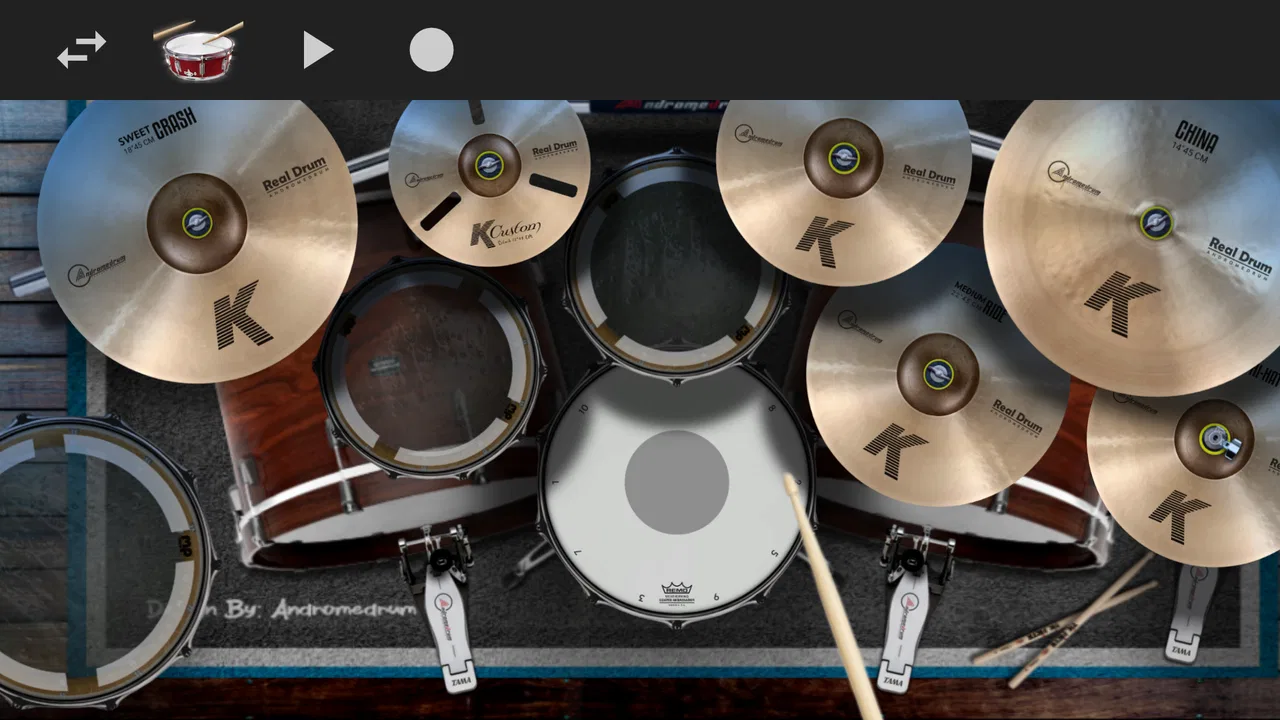
The central idea is straightforward: the screen becomes a drum set, and I play by touching the visible instruments in time with music. That makes the first session approachable even if I have never played drums. There is no need to understand notation before making a sound, and the connection between tapping a surface and hearing a drum hit is immediate enough to feel satisfying.
You May Also Like

 Blood Strike: 2.5 Anniversary
Blood Strike’s Loadouts Turn Every Drop Into a Tactical Gamble
A close look at Blood Strike’s custom loadouts: how fast access to signature weapons reshapes its battle royale rhythm, rewards preparation, and narrows the gap between fights.

 Pandora - Music & Podcasts
Pandora’s Music Is Easy to Start, but Harder to Recover
Pandora’s strength is its low-effort path from a seed to a station. Its weak spot is how much confidence it asks you to place in connection, setup, and quiet recovery.

 8 Ball Pool
 Is Built on Rivalries, Rematches, and Routine
A close look at the rivalries, rematches, shared routines, and unanswered safety questions that turn a quick pool match into a persistent mobile community.

 Samsung Music
’s Quiet Strength Is Playing What You Already Own
Its reach comes less from spectacle than from dependable access to a personal library. That simplicity is both the app’s strongest retention engine and its ceiling.

 AccuWeather: Weather Radar
AccuWeather Review: A Quick, Clear Forecast for Everyday Decisions
For everyday plans, the best forecast is the one you can understand quickly. AccuWeather makes rain timing, radar, and local conditions easy to act on, with a few trade-offs.

 Hill Climb Racing
Why Hill Climb Racing Still Turns Crashes Into One More Run
A tiny car, a bumpy hill and one more upgrade: Hill Climb Racing keeps resurfacing because its simple chaos makes every near-miss feel personal.
More From Our News Desk



I found the game most enjoyable in short bursts. A few minutes while waiting for an appointment, a relaxed session on the sofa, or a quick musical distraction during a commute all suit its design. The phone format also changes how I think about the game. I am not sitting down for a formal rehearsal; I am using it as a pocket rhythm toy that can become surprisingly absorbing when I start trying to stay with a song rather than simply tapping randomly.
The music is the important part of that experience. Playing along with real songs gives the virtual kit a purpose that a collection of isolated sound effects would not have. Even when my timing is imperfect, the song provides a musical frame, so each attempt feels like participation rather than a basic button test. That is a meaningful advantage over many simple tap games that rely on repetitive loops.
At the same time, the phone screen naturally limits the physical feeling of drumming. A real kit gives each limb a separate space, rebound from the surface, and a much stronger sense of dynamics. On a touchscreen, I am working with flat glass and compact controls. The game can suggest the action of drumming, but it cannot reproduce the tactile feedback that makes an acoustic or electronic kit so expressive.
The best way to approach it is therefore as an accessible music game with drumming at its center. I would not use it to judge whether I am ready for a professional instrument, but I would use it to explore rhythm, test coordination, and enjoy familiar musical movement without setting up equipment.
Why the offline design matters more than it first appears
The ability to play offline is one of the most practical parts of the experience. It means the game can fit situations where streaming music or a stable connection would be inconvenient. I can use it during travel, in a place with poor reception, or simply when I want to reduce the number of online dependencies in a casual game.
That feature also makes the app more suitable for younger players. A parent can hand over a device for a short music session without making the child depend on a live connection during every attempt. The Everyone content rating supports that broad accessibility, although adult supervision and normal device-sharing habits still matter in any family setting.
There is a useful preparation tip here: if I know I will be offline, I prefer to open the game beforehand and make sure the content I want is available on the device. That is a sensible habit for any offline-focused app. It avoids discovering at the exact moment of travel that a particular song or screen expects an online step.
Offline play also changes the game’s role for musicians. It can serve as a lightweight warm-up when carrying a real practice pad is not practical. I can tap basic patterns quietly, listen for the pulse, and think about where the main hits sit in a song. It will not replace structured exercises, but it is more useful than a purely visual rhythm toy because the music gives the exercise context.
What the song-based format does well
Playing with songs gives me a reason to repeat an attempt. On the first try, I may simply follow the most obvious beats. On another attempt, I can concentrate on cleaner transitions or try to add more controlled touches. That repeatability is important because a game based only on isolated taps can become tiring quickly.
A practical way to get more from it is to listen once before trying to play. I pay attention to the steady pulse, identify the strongest accents, and then begin with a deliberately simple pattern. Starting with every possible hit usually creates noise rather than rhythm. Once I feel where the song is moving, I can add more activity without losing the beat.
This approach makes the game useful for beginners who are still learning to separate pulse from decoration. The main beat is the anchor. Extra taps should support it, not compete with it. Even without formal lessons, the app can encourage that basic musical discipline through repeated listening and playing.
There is also a social use case, although the game itself should not be mistaken for a full multiplayer experience. I can pass the phone to a friend and compare how each of us handles the same song. That kind of informal challenge works because the controls are understandable almost immediately. It is a better fit for casual shared entertainment than for a serious competition built around precise scoring.
The strongest case for beginners and families
The game’s biggest strength is its low entry cost. It is free to start, so I can test the basic experience without committing money first. Optional purchases range from about two dollars to ten dollars per item, which is worth remembering if a child is using the device or if I am tempted to unlock content impulsively. The free starting point is welcoming, but the presence of purchases means I would still check the device’s purchase controls before handing it over.
For a beginner, the visual drum layout is less intimidating than a real kit. A physical setup can raise questions immediately: where should my hands go, which drum should I hit, and how do I keep a beat? Here, experimentation is cheap and quiet. I can make mistakes without disturbing anyone in the room, then try again until the song begins to feel manageable.
That quiet aspect is especially valuable in apartments, shared homes, and late-evening routines. A virtual kit cannot provide the same physical practice as a pad, but it avoids the volume problem that often prevents people from trying drums at all. I see it as a doorway into rhythm rather than the destination.
The game is also a reasonable choice for someone who enjoys music but does not identify as a gamer. Its core interaction is familiar enough to understand quickly, and the song format gives the session a natural beginning and end. There is no need to memorize a large ruleset before the activity becomes enjoyable.
Where the experience falls short
The main weakness is precision. Touchscreen drumming is inherently less expressive than using separate sticks and surfaces. My fingers can reach several on-screen areas quickly, but the screen does not always communicate the same physical separation as a real kit. When a song becomes busy, I may feel that the challenge comes from arranging my fingers on a small display as much as from understanding the rhythm.
That limitation matters if the goal is serious skill development. The game can help with listening, pulse awareness, and basic hand coordination, but I would not rely on it to build proper technique, independent limb control, stick grip, or dynamic control. A lesson, practice pad, electronic kit, or dedicated music-learning tool is better when those are the priorities.
Another point of friction is that casual simplicity can become shallow for experienced players. Once I understand the main interaction, I may want more detailed feedback about timing, consistency, or accuracy. If the game does not provide the depth I am looking for in a particular session, the songs alone may not be enough to keep me engaged indefinitely.
The phone itself can also affect comfort. Holding a device while tapping is different from sitting behind a kit, and longer sessions may feel less natural than short ones. I prefer placing the phone securely on a flat surface when possible, because trying to hold it and play at the same time can make the interaction awkward. A stable setup improves concentration even though it does not turn the phone into a physical instrument.
There is a further trade-off between accessibility and musical realism. A compact screen makes the game approachable, but it also reduces the room available for expressive playing. Someone who wants an authentic simulation should look toward a dedicated drum app designed around external hardware or toward an actual electronic kit. Someone who wants a quick song-based game may see the same simplicity as an advantage.
Useful ways to play rather than tap randomly
I get better results when I treat each session as a small experiment. First, I choose a song that feels comfortable and focus only on the main pulse. Then I repeat it while listening for the moments where the rhythm changes. Finally, I try to add controlled accents instead of increasing the number of taps everywhere. This three-step approach makes the game feel more musical and prevents frantic tapping from becoming the default.
A second useful habit is to use the game for listening practice away from formal study. I can play a song softly, identify the regular beat, and notice how the drum parts support the rest of the arrangement. Even if my hands are not reproducing every detail, I am training myself to hear structure. That is a more valuable use than treating every session as a race to create the most noise.
I also recommend short sessions when introducing it to a child. The game is easy to start, but unlimited tapping can quickly become repetitive. A simple goal such as keeping the beat through one song, then switching roles with a parent or sibling, gives the activity more shape. Because the content is rated for Everyone, it is positioned for broad use, but the best experience still comes from setting reasonable boundaries around screen time and purchases.
For a musician, the app works best as a portable idea generator. I can hear a groove, imitate its broad shape, and remember what kind of pattern I might want to explore later on a real instrument. I would not count taps on the phone as a substitute for practice, but I would use it to stay connected to rhythm when circumstances make conventional practice impossible.
Performance, access, and the practical details
Oliveira Labs has kept the game within reach of older supported devices, with a minimum operating system of Android 7.0. That broad compatibility is helpful for people using an older phone as a family or travel device. It also makes the game easier to recommend without assuming that everyone owns a recent flagship handset.
The current version is 4.9.4, and the game has been available since May 15, 2019. Those details suggest a product with a longer presence than a newly released experiment, while the version number indicates continued iteration over time. I still judge it by the moment-to-moment play rather than by age, and its straightforward format remains easy to understand.
Its reach is substantial: it has passed one million installs, and the average rating sits at 4.9 from around thirteen thousand ratings. Those figures do not guarantee that every player will enjoy the same style, but they do match my impression that the basic concept is easy for many people to appreciate. The review volume, at roughly four hundred forty-seven written reviews, also points to an active body of user feedback rather than a nearly empty listing.
The important thing is not to read popularity as proof of professional depth. A game can be widely liked because it is convenient, friendly, and fun for a few minutes. That is exactly where this title is strongest. Its audience is broader than trained drummers because it does not demand trained-drummer expectations.
Who should choose it, and who should skip it
I would recommend it to casual music fans, beginners curious about drums, families looking for a simple rhythm activity, and travelers who want something playable without a connection. It is also a good fit for people who enjoy repeating songs and gradually trying to improve their timing without turning the experience into a formal course.
I would be more cautious about recommending it to an advanced drummer, a student who needs measurable technical progress, or anyone specifically searching for realistic hardware response. In those cases, an electronic drum kit or a more specialized practice application is likely to be the better investment. The free download makes it harmless to test, but it should not be mistaken for a complete learning system.
People who dislike in-app purchases should also pay attention to the purchase range of about two to ten dollars per item. The game’s free entry is a clear advantage, yet I would make sure expectations are clear before a child explores additional content. That is not a reason to reject the game, but it is part of using it responsibly.
My clearest recommendation is to try it when the desired experience is “I want to play along with music right now,” not “I need a realistic drum simulator.” In the first situation, its accessible controls and offline usefulness make a strong case. In the second, the limitations of a touchscreen become impossible to ignore.
My final verdict
Mega Drum: Drum Set Game succeeds because it understands the value of a small, immediate musical experience. I can open it, choose a song, and begin tapping without a long learning curve or a physical setup. The offline capability gives it genuine everyday usefulness, while the free starting point makes experimentation easy.
Its weakness is equally clear: a phone cannot offer the space, feedback, or technical control of a real drum kit. The game is not where I would build advanced technique, and longer sessions may expose the limits of compact touchscreen controls. Those are meaningful compromises, not minor details.
Still, I think the balance is favorable for the right player. As a free offline rhythm game, it is inviting, portable, and more musically engaging than a basic collection of drum sounds. I would recommend it to anyone who wants a friendly introduction to playing along with songs, provided they understand that it is a playful companion to real practice, not a replacement for it.
FAQs for Mega Drum: Drum Set Game
01What is Mega Drum: Drum Set Game?
Mega Drum: Drum Set Game is a mobile drumming experience designed to let you play virtual drums directly on your Android or iOS device. The app generally presents a drum kit on the screen, allowing you to tap different drums and cymbals to create rhythms. It is aimed at casual players, music fans, and beginners who want an entertaining way to practice timing and experiment with beats.
02Is Mega Drum: Drum Set Game suitable for beginners?
Yes, the game is approachable for beginners because its controls are based on simple screen taps rather than complicated menus or musical equipment. New players can start by exploring each drum and cymbal, building basic rhythms, and gradually improving their timing. However, users looking for a complete professional drum-learning course should keep in mind that a casual mobile game may not replace lessons or a real electronic drum kit.
03Can I play Mega Drum: Drum Set Game offline?
Whether the full experience works offline can depend on the version installed and the device’s operating system. The core drumming interaction may be available without a constant internet connection, but advertisements, updates, analytics, or certain additional features might require access to the internet. It is best to launch the app once while connected, then test its main functions in airplane mode before relying on it offline.
04Does Mega Drum: Drum Set Game contain advertisements or in-app purchases?
Many free mobile music games use advertising to support development, and Mega Drum: Drum Set Game may display ads during or between sessions depending on the release available in your region. Some versions can also include optional purchases or premium features. Before downloading, check the official store listing for the current pricing and purchase information, and review your device’s parental or payment settings if children will be using the app.
05What permissions and device requirements should I check before downloading?
Before installing Mega Drum: Drum Set Game, check the official Google Play or App Store listing for its latest operating-system requirements, download size, and privacy details. The app should run best on a reasonably modern device with responsive touch input and enough free storage. If it requests permissions unrelated to gameplay, such as contacts or location access, review them carefully and deny anything you do not consider necessary.
Pros
- Simple touch controls make it easy for beginners to start playing.
- Offers a quick way to practice drum patterns anywhere.
- Responsive taps help keep basic rhythms feeling satisfying.
- Lightweight gameplay is suitable for short
- casual sessions.
- Can be entertaining for music fans without requiring real equipment.
Cons
- Limited depth may disappoint experienced drummers seeking advanced practice tools.
- Timing accuracy can depend on your device’s touch response.
- Small screens may make certain drum pads uncomfortable to hit.
- Extended play sessions can become repetitive without more variety.
- Audio quality and volume may vary between phones and tablets.

Mega Drum: Drum Set Game
Gallery